
Key Insights
- Battery drainage alone does not prove hacking. Look for multiple unexplained warning signs.
- Spyware can expose sensitive information. Some applications can monitor location, messages and online activity.
- Compromised accounts are another risk. Someone may access personal information without installing spyware on your phone.
- Preserve potential digital evidence. Avoid rushing to delete applications or reset your device.
- Professional investigation can provide clarity. Appropriate technical examination can help establish whether suspicious activity requires further action.
Introduction
Your smartphone knows more about your personal life than most people around you. But what if someone else has access to that information without your knowledge?
Smartphones store personal conversations, photographs, financial information, location history and private communications. While modern devices have strong security features, unauthorised access through spyware, malicious applications or compromised accounts can expose sensitive information.
Recognising the warning signs is the first step towards protecting your privacy. Here are 10 possible indicators that your phone may be hacked or tracked, along with practical steps you can take to investigate suspicious activity.
1. Is Your Phone Hacked or Being Tracked? Understanding the Difference
Phone hacking and phone tracking are related but different concerns. Knowing which one you are facing is the first step, and it is also what professional mobile investigation services look at before checking a device.
Phone hacking generally involves gaining unauthorised access to a device, account or personal information. This may happen through malicious applications, phishing links, stolen passwords or security vulnerabilities.
Phone tracking involves monitoring someone’s location or mobile activity. It may happen through legitimate location-sharing features, compromised accounts or spyware applications installed without the user’s knowledge.
One example is stalkerware, a type of software that can secretly monitor someone’s location, messages, photographs and online activities.
According to the US Federal Trade Commission (FTC), some stalkerware applications are deliberately designed to remain hidden from the device owner. Understanding these differences helps you work out what kind of security concern you may be dealing with, and whether you need mobile investigation services to examine your phone properly.
2. 10 Warning Signs That Your Phone May Be Hacked or Tracked
A single unusual phone behaviour does not necessarily mean someone is monitoring your device. However, multiple unexplained changes deserve attention. Here are ten warning signs worth checking.
1. Unusually Fast Battery Drain
If your phone battery suddenly starts draining much faster than usual, background applications could be consuming additional resources. Some monitoring applications operate in the background and may contribute to battery consumption. However, ageing batteries, software updates and resource-intensive applications can also cause this problem.
2. Your Phone Frequently Overheats
Does your phone become unusually hot even when you are not using demanding applications? Continuous background activity, excessive data processing or unfamiliar applications could be contributing factors. Check your battery usage and background application activity before assuming surveillance.
3. Unexpected Mobile Data Consumption
Spyware or monitoring applications may transmit information from a device to an external server. If your mobile data consumption increases without an obvious explanation, review your application-wise data usage. Look for unfamiliar applications consuming unusually large amounts of background data.
4. Unknown Applications Appear on Your Phone
Unfamiliar applications deserve closer inspection, particularly those requesting unnecessary access to sensitive information. Some stalkerware applications may disguise themselves using names that resemble legitimate system services. Review your installed applications and investigate anything you cannot identify.
5. Unusual Camera or Microphone Activity
Modern smartphones display privacy indicators when applications access the camera or microphone. If you notice unexpected camera or microphone activity, check which application is responsible. Review the permissions granted to applications and revoke access where it is unnecessary.
6. Someone Knows Your Exact Location
This is one of the more concerning situations. Someone repeatedly knowing where you are, even when you have not shared your location with them, may warrant a closer look. Possible explanations include location-sharing settings, access to your Google or Apple account, or an application with location permissions. Review your location-sharing settings and connected devices.
7. Suspicious Login Notifications
Receiving unexpected security notifications about account logins can indicate that someone has attempted to access your personal accounts. Check your Google, Apple and social media account activity. Pay particular attention to unfamiliar devices, login locations and password-reset notifications.
8. Unfamiliar Device Administrator Permissions
Some malicious applications attempt to obtain elevated permissions to make themselves harder to remove. On Android devices, review device administrator applications and Accessibility permissions. Investigate unfamiliar services that have permissions they do not appear to need.
9. Unusual Messages or Outgoing Calls
Check your call history and message activity for communications you do not recognise. Unexpected messages, unknown outgoing calls or suspicious links sent from your account may indicate compromised access. However, network issues, account synchronisation and other technical problems can also cause unusual activity.
10. Someone Knows Your Private Conversations
Perhaps someone unexpectedly refers to a private conversation, personal photograph or information you have never shared with them. This may raise concerns about unauthorised access to your messages, cloud accounts or personal devices. Look for additional evidence rather than assuming your phone is necessarily compromised.
3. How to Check If Someone Is Tracking Your Phone
If you suspect unauthorised monitoring, start by reviewing your device settings. The following checks can help identify suspicious permissions, unfamiliar applications and unexpected account access.
For Android Users
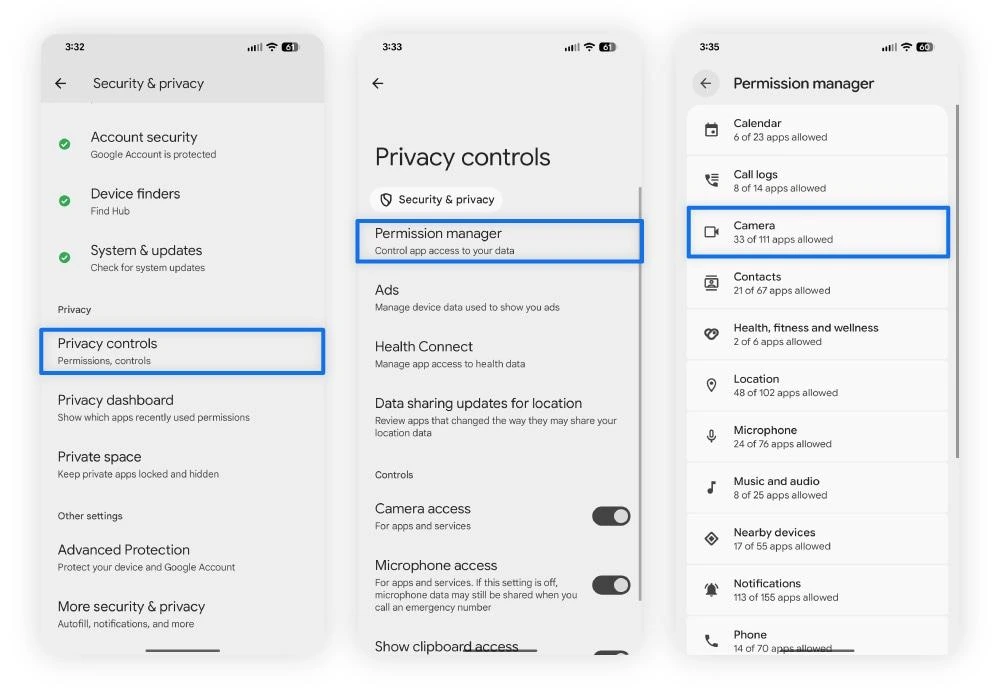
- Review installed applications: Open Settings and check your installed applications for anything unfamiliar.
- Check app permissions: Review which applications have access to your camera, microphone, contacts and location.
- Review Accessibility services: Check whether unfamiliar applications have been granted Accessibility access.
- Check device administrator access: Review applications with administrator privileges.
- Review Google account devices: Visit your Google Account security settings and check devices currently signed in.
- Run Google Play Protect: Open Google Play Store, select your profile and choose Play Protect to scan for potentially harmful applications.
Google Play Protect checks applications for harmful behaviour and can warn users about potentially dangerous software.
For iPhone Users
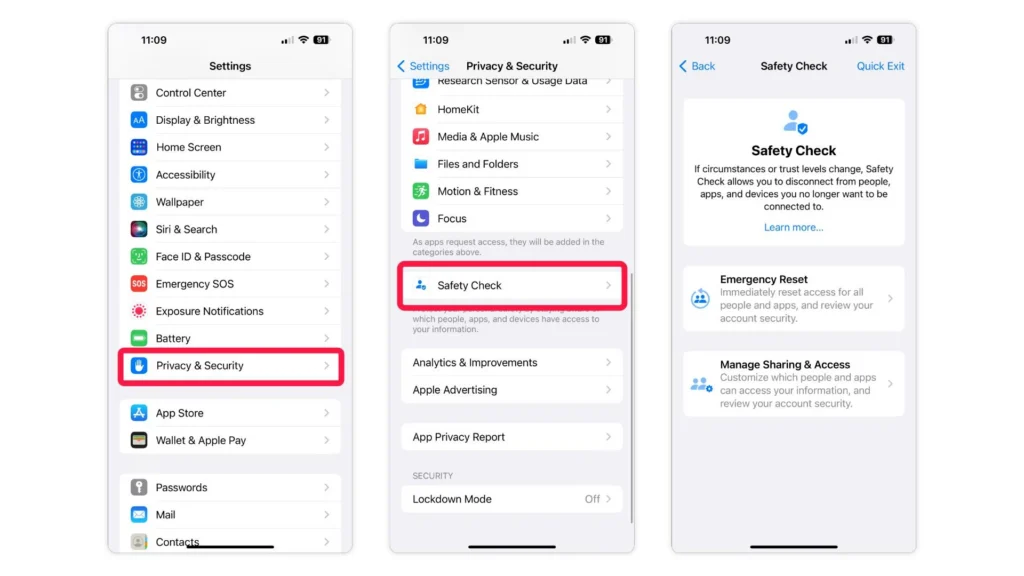
- Check Safety Check: Go to Settings, Privacy & Security and Safety Check.
- Review location sharing: Check whether your location is being shared with unfamiliar people.
- Check Apple Account devices: Review the devices connected to your Apple Account.
- Review application permissions: Check which applications can access your camera, microphone, contacts and location.
- Check device management profiles: Review unfamiliar VPN or device management profiles.
Apple’s Safety Check feature, available on iPhones running iOS 16 or later, allows users to review information shared with people and applications and manage connected devices.
4. What Should You Do If You Suspect Your Phone Is Hacked?
Discovering suspicious activity can be stressful, but reacting without a plan can make the situation more complicated.
- Avoid suspicious links: Do not open unexpected links or download unknown applications.
- Document unusual activity: Record suspicious notifications, application names, account alerts and other relevant information.
- Secure your accounts: From a trusted device, change important passwords, starting with your email and primary accounts.
- Enable two-factor authentication: Add another layer of protection to your important accounts.
- Update your device: Install the latest available operating system and security updates.
- Review application permissions: Remove unnecessary access to sensitive information.
- Seek technical assistance: If suspicious activity continues, consult a qualified cybersecurity professional.
Important safety consideration: If you suspect that someone close to you is using stalkerware to monitor your activities, do not immediately delete suspicious applications or reset your phone. Such actions could alert the person monitoring you. Consider using a different, trusted device to seek assistance and plan how to preserve relevant evidence safely.
5. Can Professional Investigation Help Identify Phone Tracking?
When basic security checks do not explain suspicious activity, professional assistance may help clarify the situation.
Mobile Investigation Services can be relevant when individuals suspect unauthorised access, digital surveillance or misuse of personal information.
Depending on the circumstances and available technical evidence, an appropriate investigation may involve:
- Examining suspicious mobile activity.
- Reviewing relevant device and account information.
- Identifying potential signs of unauthorised access.
- Documenting suspicious digital activity.
- Assessing whether further technical examination is required.
It is important to understand that not every investigation can establish exactly who accessed a device or how monitoring occurred. Some findings may require specialist digital forensic examination.
Professional Private Investigation Services may also help individuals understand the available investigation options when privacy concerns extend beyond their mobile devices.
6. When Should You Consider Professional Mobile Investigation Services?
Not every phone malfunction requires a professional investigation. However, certain situations deserve closer attention.
- Someone repeatedly appears to know your private location or activities without explanation.
- You suspect unauthorised access to personal conversations or photographs.
- You experience persistent digital harassment or surveillance concerns.
- Your device shows multiple unexplained security changes.
- You need help understanding or documenting suspicious mobile activity.
A professional assessment can help distinguish genuine security concerns from ordinary technical problems. The objective should be to establish facts through appropriate investigation methods rather than relying on assumptions or isolated warning signs.
7. How to Protect Your Phone From Future Tracking
Prevention is often easier than dealing with the consequences of compromised access. Follow these basic security practices:
- Download applications only from trusted sources.
- Use a strong screen-lock password or biometric authentication.
- Never share your device password or account credentials unnecessarily.
- Keep your operating system and applications updated.
- Review location-sharing settings regularly.
- Avoid clicking suspicious links received through messages or emails.
- Enable two-factor authentication on important accounts.
- Regularly review connected devices and active account sessions.
These precautions can reduce the risk of unauthorised access and help protect your personal information.
Frequently Asked Questions
Look for unexplained location-sharing activity, unfamiliar applications, suspicious account logins and unusual permission settings. No single indicator confirms tracking.
Yes. Someone with access to your Google or Apple account may be able to access certain location information or other shared data without installing additional tracking software.
Depending on the type of compromise, someone may gain access to messages through linked devices, compromised accounts or malicious software with sufficient permissions.
No. Battery drainage can result from background applications, ageing batteries, poor network connectivity and software updates. It should be investigated alongside other suspicious signs.
Qualified professionals may examine suspicious device activity, account access and relevant digital evidence. The extent of an investigation depends on the device, available evidence and technical capabilities.
Conclusion: Protect Your Privacy With the Right Investigation Support
Your smartphone holds a significant amount of personal information, making mobile privacy an important part of personal security. Unusual battery consumption, unfamiliar applications, suspicious account activity and unexpected location access should not be ignored, particularly when several warning signs appear together.
However, jumping to conclusions without technical evidence can lead to unnecessary concern. Understanding the source of suspicious activity and preserving relevant information are essential steps towards protecting your privacy.
Eye Witness recognises the importance of personal privacy and reliable investigation support. Through its investigation services, individuals concerned about suspicious activities can explore appropriate professional assistance. Whether the concern involves suspected mobile surveillance, unauthorised access or other privacy-related matters, seeking the right guidance can help establish a clearer understanding of the situation.
If you have concerns about your mobile privacy, contact Eye Witness to discuss your investigation requirements.